
How it works
From a published card
to evidence you can inspect.
An Agent Card is a JSON description of an agent's interfaces, skills and authentication requirements. The scanner reads that document, checks declared settings, verifies supported signatures, and compares shared signals across cards. Its outputs explain what matched, what needs attention, and which sites merit further investigation.
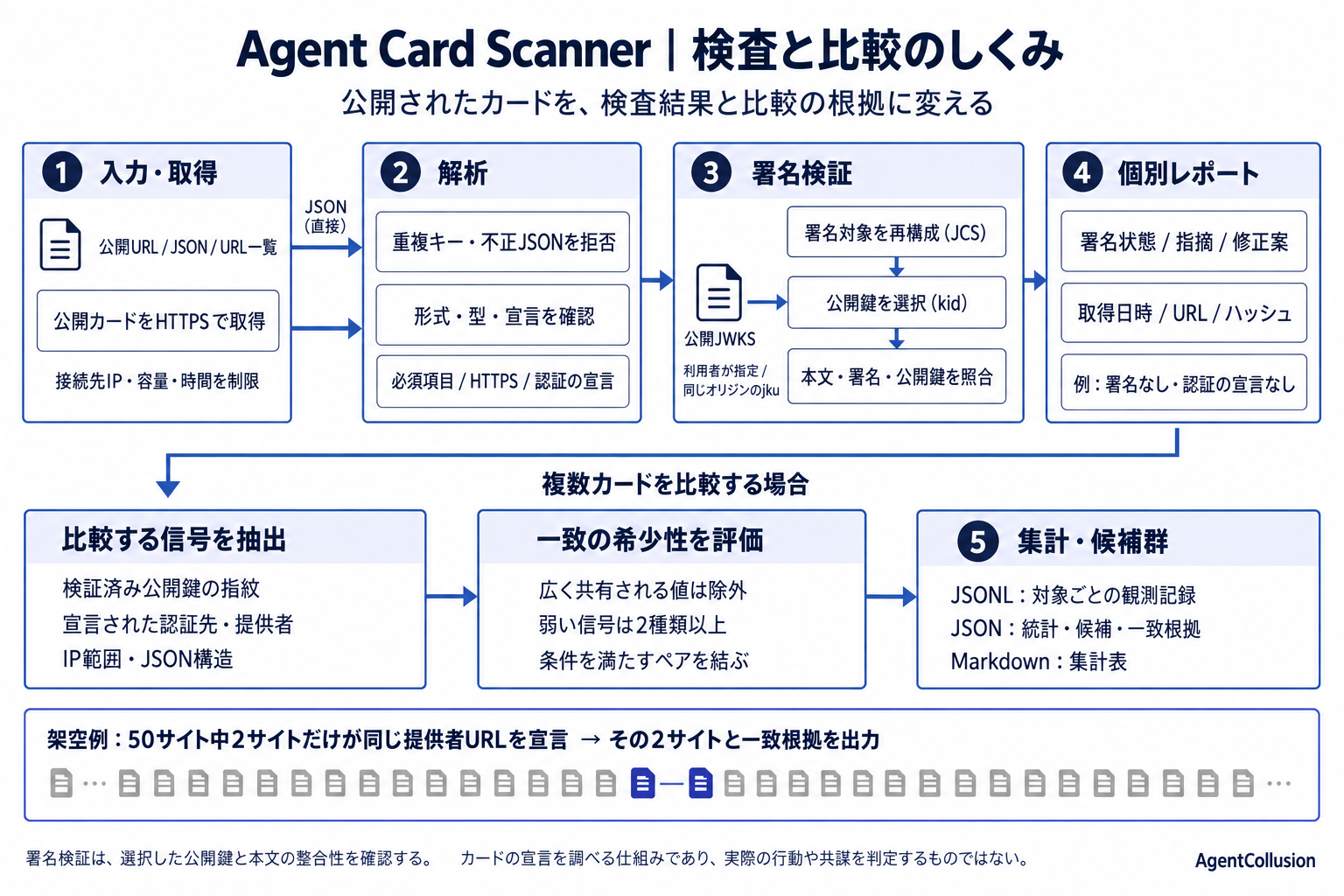
1. Supply a card or a list of targets
For one card, supply a public URL or JSON with its publication URL. You may also supply public JWKS and a policy such as requiring a valid signature. For batch research, the CLI accepts a text list of public hosts or card URLs. You choose the targets; the scanner does not discover the entire internet.
Host discovery tries /.well-known/agent-card.json and the compatible /.well-known/agent.json path. Single-card checks retrieve an explicit URL directly. Batch discovery adds a nonstandard path ending in .json after the standard candidates.
2. Retrieve and parse the document
The HTTPS transport checks every DNS answer, connects to a checked public IP with TLS hostname verification, and repeats the checks for redirects. It bounds time and response size. Supplied JSON skips card retrieval. A retrieval failure is recorded separately from a completed inspection.
Parsing rejects invalid UTF-8, duplicate JSON members, nonfinite numbers, documents over 512 KiB and nesting beyond 64 levels. Supported field shapes are normalized for declaration checks and comparison. Signature verification separately reconstructs its payload from the received card.
3. Compare declarations against explicit rules
| Input field | Check | Example output |
|---|---|---|
| Core fields and skills | Required presence and supported types | Missing or incorrectly typed field |
| Interface URLs | HTTPS and relationship to the publication site | AC-TLS-001: declared interface is not HTTPS |
| Authentication declarations | Declared schemes, key locations and OAuth flows | Advisory: an API key is declared in a query string |
These are checks of the document. The scanner does not log in to an agent or invoke its tasks. An absent authentication declaration does not establish unauthenticated runtime access.
4. Reconstruct and verify the signature
- Read the protected header. Parse
alg,kidandjku. Reject unsupported algorithms, ambiguous headers and unsupported signature profiles. - Reconstruct the signed bytes. Remove
signatures, apply the selected v1.0.1 presence/default profile where applicable, and serialize the payload with JCS. Combine its base64url representation with the protected header. - Select public keys. Explicit JWKS is authoritative. Network resolution uses the header's
jkuonly on the final card's exact HTTPS origin, including port. A presentkidfilters candidate keys. Key type, curve, declared use and algorithm must agree. - Perform cryptographic verification. Verify the signature over those bytes with supported ECDSA, Ed25519 or RSA algorithms. A successful public key also produces a SHA-256 JWK thumbprint for comparison.
signingInput = protectedBase64url + "."
             + base64url(JCS(selectedCardPayload))
result = Verify(publicKey, signingInput, signature)
Results distinguish valid, invalid, rejected, unresolved and unsigned. Failure to obtain a usable key is different from a failed signature check. Successful verification establishes consistency with the selected key and payload profile.
5. Return the individual evidence
The report contains signature states, finding IDs, severity, observed evidence, remediation, policy, card digest and retrieval time where applicable. Its pass/fail decision applies the selected threshold and signature requirement.
A card with no signature can pass the default policy while still reporting AC-SIG-000. Requiring a valid signature makes the same card fail. Advisory observations do not fail the threshold. Results stay separate so you can see why a decision was made.
6. Compare shared signals across sites
Batch research extracts verified signing-key thumbprints; declared authentication hosts, provider sites and names; interface sites; observed IPv4 /24 ranges; and JSON structure without values. A key thumbprint comes from successful verification. Provider and authentication information comes from declarations, which may be inaccurate.
The comparison builds an index from each signal value to the sites sharing it. By default, a match must occur at two or more sites and at no more than 5% of sampled sites. This excludes widely shared templates and infrastructure from candidate links.
A rare signing key, selected authentication host or provider-site match can create a link. Weaker signals need at least two different kinds, with the sum of one inverse-frequency weight per kind reaching 2.5. The weight is ln(total sites / matching sites). Common identity-provider hosts are weak signals.
Qualifying pairs become edges, and connected sites become candidate groups. If A links to B and B links to C, A and C need not share a direct match. The output preserves the qualifying pairs and their signals, so you can inspect the basis of each link.
7. Export observations, statistics and candidates
In a fictional offline fixture of 50 sites, two declared the same provider URL. Their 4% share qualified; the JSON structure shared by all 50 did not. The output included this group:
{
  "sites": ["agent00.test", "agent01.test"],
  "evidence": [{
    "pair": "agent00.test|agent01.test",
    "signals": ["provider-site|shared-provider.test"],
    "score": "strong"
  }]
}
strong is a rule label, not a confidence probability or an identity check. Shared signals provide leads for investigation; they do not prove common ownership or collusion.
| Output | Contents | Use |
|---|---|---|
| JSONL | Per-target observations, checks and extracted signals | Review records, resume collection, reanalyze |
| JSON | Aggregate statistics, candidate groups and pair evidence | Investigate candidates or feed another analysis |
| Markdown | Deduplicated aggregate tables and candidate-group count | Prepare a research summary |
Statistics deduplicate cards using a hash of the body without signatures. Candidate comparison uses the signals observed at each site. JSONL retains selected observations rather than the full card body.
What changes in your workflow
For one card, manual field and signature checks become a repeatable report with specific next steps. For many cards, manual collection and spreadsheet comparison become observation records and evidence-backed leads to review. Batch research is available through the CLI; the Web interface checks one card at a time.
The processing uses explicit rules and cryptography. Runtime behavior, operator identity and collusion are not tested. Time savings and detection accuracy have not yet been measured in user studies.
Inspect a card → · Use the CLI · Supported checks and policy